There is no denying the fact that devices by Apple are smart and efficient. But one downside I feel we can collectively agree on is the iPhone keyboard. I feel no shame in admitting that I have been a subject of jokes due to the not-so-smart auto-correct feature of iPhone keyboard. While Android users have the luxury of adding alternative keyboards in their device (here are someAndroid keyboard appsfor your use), iOS users brought the facility to the users in 2014 with iOS 8.
Now, you have the option of changing keyboard in iPhone to type more efficiently. There are many third-party keyboard applications in Apple App Store that allow you to add efficient and cool keyboards. With plenty of options available that offer the facility of keyboard background, custom key click sounds, a dedicated iPhone emoji keyboard, swipe typing, etc., you can change your iPhone keypad according to your requirement.

Go through the below-given list of best iPhone keyboard apps and choose the best keyboard for your iPhone.
Before we proceed to the list of top keyboard apps for iPhone, also check out our other lists of best iPhone apps.
Best iPhone Keyboard Apps for Typing Effortlessly in 2019
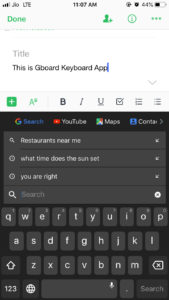
1.Gboard– iPhone Keyboard App with integrated Google search engine
Imagine having the Google search bar on your iPhone keyboard so that you don’t have to switch apps to search something. With Gboard app, you can bring this functionality to your iPhone. A small ‘Google’ button on the Gboard app gives you the feature to search for anything.
More importantly, by merely tapping on the search results, you can share the result with your friends in the app you are using. With location services on, you can even search for nearby restaurants and ATMs. Keys are neatly arranged, and it is not difficult to get used to if you are switching from default iOS keyboard to Gboard.
Special Features of Gboard App
Gboard app is one of the most popular keyboard apps used by many iPhone owners. The app’s card styled format makes it easy to use and share content from within the keyboard. With Google search facility, you can search meanings of words, share match scores with your friends and search GIFs.
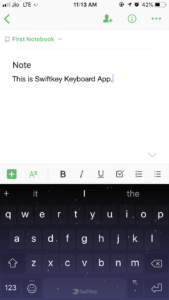
2.SwiftKey Keyboard– Best iPhone keyboard app for error-free typing
If you’re someone who is tired and embarrassed of sending text messages full of typos, then SwiftKey Keyboard is the app for you. It’s one of the best iOS keyboard app because of its efficient autocorrect feature which is based on artificial intelligence. According to app owners, the app learns from your typing habits to provide better text and emoji prediction. The ‘flow’ option of the app allows you to type faster by swiping on keys instead of tapping on them.
By spending few dollars, you can change the theme of your keyboard, or you can choose from the free themes provided in the app. Moreover, you also have the option to design your own theme in this keyboard app for iPhone.
Special Features of SwiftKey Keyboard App
SwiftKey with its AI-based predictive system makes for one the best alternative keyboard for iPhone. The keyboard app has tonnes of customization options for users to enhance productivity. It can be a good option for those who are tired of the default iPhone keyboard and want to try something precise.
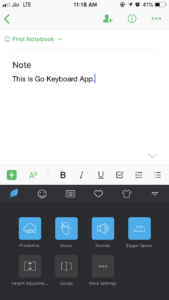
3.GO Keyboard– iPhone Keyboard app with many customization options
Go Keyboard app is one of the must-have iPhone keyboard apps if you want to customize your keyboard to suit your usage. The app lets you customize the size of the keyboard according to the app in which you are typing, tap sounds, the theme of the keyboard, design your own theme, adjust the width of space, etc. you may swipe type by gliding on keys and add custom symbols. The app extends the support to as many as 40 languages including many local languages of several countries.
Special Features of GO Keyboard App
Go Keyboard can be downloaded if you want to converse in the local language of your country which is not easily available in other iOS keyboard apps. Plenty of customization options is also a significant feature of this third-party iPhone keyboard app.
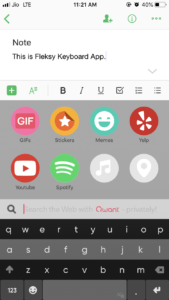
4.Fleksy– iPhone Keyboard App with Gesture-Based Controls
Fleksy is a free keyboard app for iPhone (with paid in-app purchases) designed to help you type efficiently and faster. you’re able to add extensions to the keyboard to make typing a hassle-free task. Colorful themes and option of choosing from thousands of GIFs & stickers make this iOS keyboard app one of the favorites of many. Unfortunately, there is no option of swipe typing, which can be a letdown for some people. With gestures involving swiping on the keyboard, you can invoke many actions on this keyboard. Fleksy iOS keyboard app supports more than 42 languages including English, Greek, Italian, Russian, etc.
Special Features of Fleksy App
Fleksy app for iPhone is designed to minimize the efforts put in for typing. The simple gestures are easy to use and save time. It may take some time to get used to the keyboard app, but once you are ready, typing will be fun with this app.
Also Read:8 Best iPhone Web Browser Apps
5.TouchPal Keyboard– Best iPhone Keyboard app for beautifying your keyboard
If your aim of downloading a third party iPhone keyboard app is to get rid of the boring design of the default iPhone keyboard, then TouchPal Keyboard app is the app you must download. The app functions like a normal keyboard with the functionality of gliding fingers over keys for enabling Swype keyboard for iPhone. What makes the app stand out from the rival keyboard app is the number of cool themes and backgrounds you can add in your iPhone keypad. You also have the option of designing your own theme by picking a photo from your image gallery.
Special Features of TouchPal Keyboard App
TouchPal keyboard app is the best iOS keyboard app for those who want to try new themes and want a cool keyboard on their mobile phone. The simple keyboard app also allows you to use Swype typing feature.
6.Bitmoji– iPhone Keyboard app with personalized emojis
Bitmoji is not a normal keyboard app for iPhone; it is designed for those who want to express themselves in emojis. Snapchat users would be familiar with the concept of Bitmoji. The app creates your avatar — ‘an emoji based image’ that can be used in a variety of messaging apps. It is one of a kind iPhone emoji keyboard with plenty to play around.
Special Features of Bitmoji Keyboard App
The only reason of adding Bitmoji iPhone Keyboard app in this list is to provide those users an option who want more than mere texts. I feel, with your avatar, you may express yourself in a better manner.
7.Grammarly Keyboard– Best iOS Keyboard app for Emails and Business Proposals
Grammarly, the famous English language writing enhancement platform, has its own keyboard app for iPhones. The app has combined the effective spell checker and grammar checker functionalities of the Grammarly. You can use this application if you frequently type official mail and business proposals where incorrect grammar and typos can be disastrous. This iOS keyboard app is simple to use, and with the tap of a button, your entire text is scanned for contextual grammar errors, spelling errors and suggestions are provided for enhancing your writing.
Special Features of Grammarly Keyboard App
Grammarly Keyboard is the best iPhone keyboard app if you want to eliminate typos completely. It is a must-have keyboard app if your type official emails and business documents on your iPhone. Moreover, it is free to use.
8.Blink Keyboard– A one-hand keyboard app for iPhone
Blink Keyboard app is one of the best iPhone keyboard apps if you want the comfort of typing combined with the advanced auto-correct feature. You can consider it as a reliable and efficient alternative keyboard app if you are planning to drop the default iPhone keyboard. Its resizable keyboard and simple swipe gesture to turn it into a one-hand keyboard make it a decent keyboard for iPhone. The quick text feature allows you to insert frequently used text swiftly.
Special Features of Blink Keyboard App
Blink Keyboard app is a fast-typing emoji keyboard for iOS devices. You can give it a try if you find it inconvenient to type with both hands. The exciting features of the app might seem difficult to grasp at first, but once you get used to the functions, it’s a child’s play.
Also Read:8 Best PDF Reader Apps For iPhone
9.FancyKey– Smart & Fully Customizable Keyboard For iPhone
If you are searching for an iOS keyboard that offers you complete customization as well as all the features of a full-fledged keyboard then FancyKey keyboard app for iPhone should be your choice. There are more than 100 funky fonts and 50+ integrated themes to choose from. Additionally, you can also set your favorite clicked picture as your iPhone keyboard theme.
Special Features Of FancyKey App
FancyKey app is one of the best keyboards for iPhone that offers customization options as well as all the keyboard features such as auto-suggest, auto-correct, sipe input method, double space for full-stop, etc. This is a paid iOS keyboard app that comes with a three-day free trial.
10.ReBoard Keyboard App– iPhone Keyboard App For Increasing Productivity
ReBoard is a revolutionary keyboard app for iPhone with in-built 27 apps for boosting multitasking. This iOS keyboard app eliminates the need to switch between different apps while texting to share links, search products on Amazon and share files stored on Google Drive or Dropbox while writing an email.
Special Features Of ReBoard Keyboard App
ReBoard Keyboard app is certainly one of the best keyboards for iPhone if you are the one who loves to save time while multitasking. The app also performs other basic functions you would want for a keyboard app such as auto-correct, moving the cursor with space key, double tap for full-stop and other such features.
Third-Party iPhone Keyboards Come With Risks
Third-party iPhone keyboard apps give you an option to customize your keypad as per your preference, but one must be cautious while installing any such app because such keyboards can access your sensitive information. With a plethora of features come the risk of breach of privacy. You can deny full access if you want to prevent this but then again, you will not be able to unlock complete features of a third-party iOS keyboard app without it.
Break Away From Default iOS Keyboard
With aforementioned keyboard apps for iPhone, you can ditch the default iOS keyboard. It is darn difficult to choose the best keyboard app for iPhones as the features offered by different apps vary. It all depends on your usage. You can tell us your favorite keyboard app from the list given above.
Also Read:15 Features Of iOS 12: What’s New In The Big iPhone And iPad Update?