Xiaomi is one of the biggest smartphone manufacturers in the world and leads the smartphone industry in India, mainly due to its low-priced phones offering good specifications. But hardware is not the only source of its revenue; targeted advertising also contributes a huge share to its overall revenue. So here is how you’re able to remove ads in any Xiaomi or Redmi device.
Why are there ads on Redmi/Xiaomi devices?
Back in 2019, the Chinese tech giant said itstrongly believesthatserving adsis not an unfair practice. The obnoxious and intrusive system ads on MIUI attest to that. Basically, the ads in MIUI 12 are not going anywhere. But in this article, we will tell you how you’re able to manually remove ads from your Mi phone.
How To Disable Ads in Redmi/Xiaomi Devices [MIUI 11/ MIUI 12] –
While Xiaomi does not offer a standardized procedure to disable ads, there are a bunch of steps that users can follow to get rid of Xiaomi’s ad “recommendations.”
Note that the steps below do not require using theMi Unlock toolor rooting the device. It’s one way to do things but is relatively more tedious and could bring along a bunch of problems.

So without any further ado, here is how you candisable ads in MIUI 12without rooting your Xiaomi device –
Remove ads by revoking authorization for MSA app
Revoking authorization for MSA (MIUI system ads) is the building block for our journey in disabling ads on MIUI devices. Since it’s a system app, you won’t find it on the home screen.
By disabling MSA, Xiaomi won’t have permission to display MIUI system ads on the default apps such as Browser, security, etc. Mi fans have reported that the step alone isn’t enough to get rid of ads on MIUI devices.
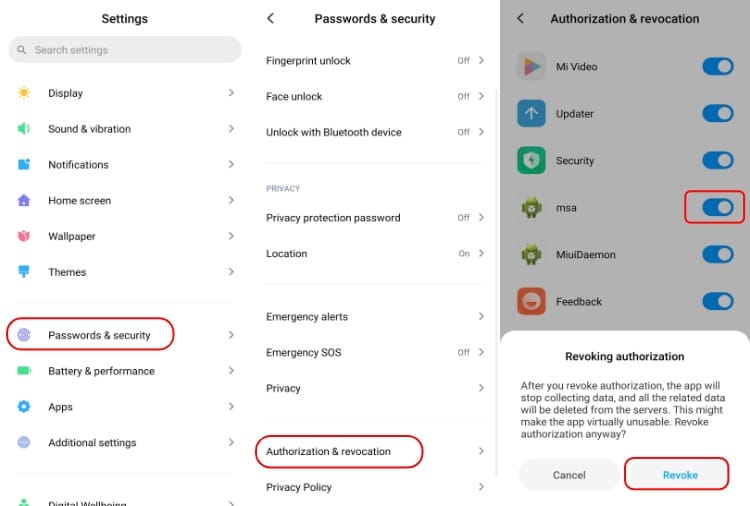
Note-For whatever reason, disabling the MSA in the Xiaomi system settings isn’t enough to remove ads in several Mi apps. Hence, you need to manually toggle them off. You can find out how to can remove ads from Mi apps manually down below.
Remove targeted ads in Redmi/Xiaomi Devices
This next step won’t remove the Xiaomi ads, but at least the ads won’t be based on your personal information.
In order to remove ad personalization in MIUI –

Remove ads from “GetApps” in Redmi/Xiaomi Devices
This will stop all ads and annoying notifications from the MIUI app store. If you are fond of GetApps, note that you will still be able to use the app.
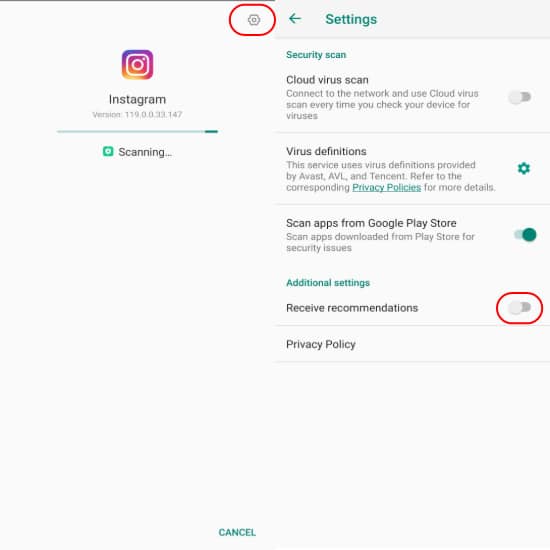
Remove ads in Mi Security Scan
Remove ads in Mi Security App
Remove ads in Mi File Manager
Remove ads in Mi Browser
Remove ads in Mi Downloads
Remove ads in Mi Themes
Remove ads in Mi Video and Mi Music
Following all the steps would hopefully stop all the MIUI systems ads on your Xiaomi device.
If the Mi app you are looking for isn’t here, here is what you may do — attempt to find a setting encompassing the word “Recommendations” or something related to ads and disable it.
Delete MIUI System Apps (Remove Bloatware)
Here is another way to remove ads from your Xiaomi/Redmi device; however, the catch is that this step would disable the app entirely.
If the steps for disabling ads in Xiaomi devices are too much to ask for, you can get rid of MIUI system apps by following the steps mentioned in our article —How To Remove Bloatware from Xiaomi Devices.

Before you become doubting Thomas, the process does not require rooting your device orunlocking the bootloader; however, know that it is a little technical.
Moreover, you can also check out our article onhow you can get rid of windows bloatwareeasily and quickly.
1. What is msa in MIUI?
MSA stands for MIUI System Ads. It’s the process that enables Xiaomi devices to showcase ads. Once you revoke its authorization in the Xiaomi settings, it stops collecting user’s data.
2. How to disable ads in MIUI 12?
It’s the same as it was in MIUI 11. You can disable ads in MIUI 12 by revoking MSA in Xiaomi settings and shutting down ad recommendations in all MIUI system apps.
