Most of the viruses modify the attributes of a file or a folder such that they become very hard to access. Some of the attributes that are changed in a file or a folder are the read, write or the execute permission on that file. Using ‘attrib’, one of the cmd commands, we can try our hands to change the attributes of a file and reset the file’s internal structure in order to recover a file.
Some of the well-known examples of the above kinds of the viruses are:

Remove Virus Using CMD from USB/ any Drive on Windows 10:
In order to remove a virus using cmd, we will use afamous cmd commandcalled ‘attrib’ command.
It can be easily guessed from its name that the’attrib’command represents different attributes of a file, folder or a directory. This command is mainly responsible for displaying, setting and removing the different attributes like read-only, archive, system, and hidden attributes of a file or folder.

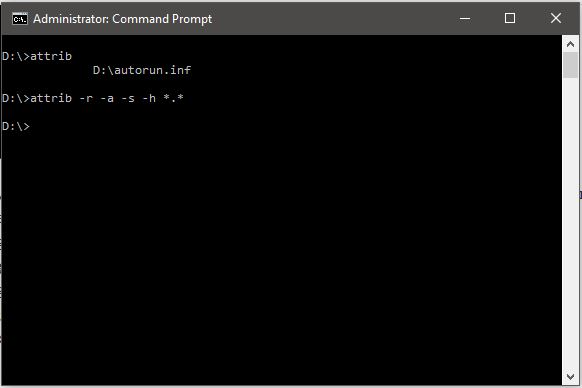
Using this command, we will attempt to change the attributes assigned to a file and thus recover our file.
Also Read:Windows Keyboard Shortcuts Cheat Sheet For Windows 10
Here are the basic attributes of the ‘attrib’ command which we will use later:
“attrib” Syntax:
ATTRIB [+ attribute | - attribute] [pathname] [/S [/D]]
In the above command, let’s see what the different parameters and switches are:

‘+ / –': To enact or to cancel the specified attribute.‘attribute’: As explained above’/S' : Searching throughout the entire path including subfolders'/D': Include any process folder’pathname': Path where the target file or folder is located.
Here is the proper syntax for attrib command:
ATTRIB [+R | -R] [+A | -A ] [+S | -S] [+H | -H] [+I | -I] [drive:][path][filename] [/S [/D] [/L]]
Let’s get started:
Also Read:Use the New Windows 10 Keyboard Shortcuts in Command Prompt
I am going to transfer an ‘autorun.inf’ virus from my USB drive to myD:drive and delete that virus from myD:drive.

I hope this would have been informative for you. If you know some other tricks, let us know in the comments below.
Also Read:How To Create Bootable USB Without Any Software In Windows 10 (Using Command Prompt)