Previously, we’ve told you about some basic Linux commands to help you get started with the process. In this article of theLinux Lexiconseries, we’ll be talking about the man command in detail. We’ll tell you what exactly are man pages, what do they contain, their navigation and much more.
In order to resolve this dilemma, Linux has provided themancommand at your disposal. Each Linux command line program comes with its own documentation, known as the ‘manual pages’ or ‘man pages’ in short.
Like the name suggests, it is sort of like a help manual that you can refer to when you are stuck somewhere and have no idea on how to proceed further. In order to access the man pages, we type in the word ‘man’ followed by the name of the command, utility, or program about which you want to find something out.
Man pages are meant to be quick reference material and can’t exactly be termed as being tutorials. They are mostly written by the same people who designed the program themselves. Using the man command efficiently can go a long way in improving your Linux experience and is a great reference tool to have by your side.
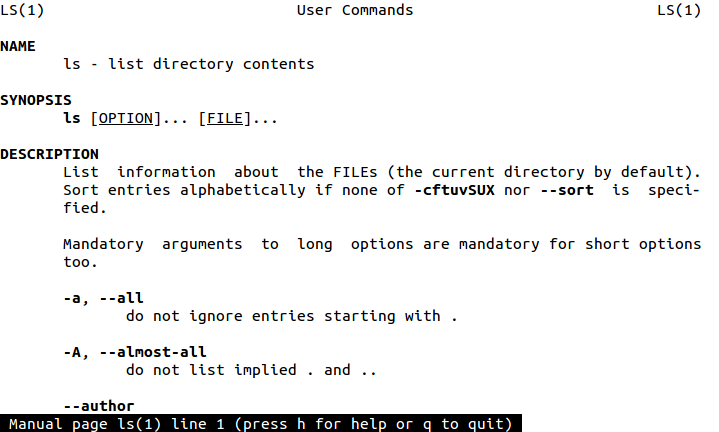
Let’s try out the man command. Open theterminaland type:
Navigation of Man Pages
First up is the navigation of man pages and how to move around. Here is a concise version of what you can do:
Enter – Move down one lineSpace – Move down one pageg – Move to the top of the pageG – Move to the bottom of the pageq – Quit
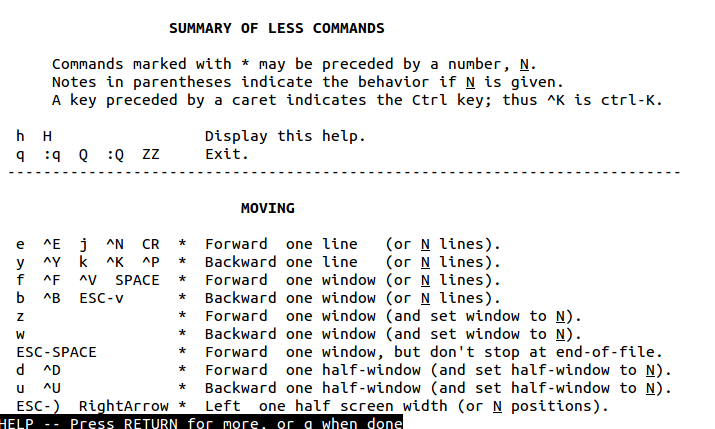
In order to seek help for the man command, just type in the letter h while viewing a man page. Doing so will prompt you with a screen like this:
Although you will be able to do just fine with the concise version that I just gave you, but go through this in order to learn more upon how to navigate in detail.
Contents of Man Pages
Now, let’s discuss the output of the man command as shown in the output above.
The number in the parenthesis against the name of the command like “ls(1)” tells you about which ‘SECTION’ of the man page you are viewing. The various man pages sections are:1. Executable programs or shell commands2. System calls (functions provided by the kernel)3. Library calls (functions within program libraries)4. Special files5. File formats and conventions6. Games7. Miscellaneous (including macro packages and conventions)8. System administration commands (usually only for root)9. Kernel routines
Following it is the NAME section which gives the name of the command itself, followed by a short description of what the command does. eg: “ls – list directory contents”
The SYNOPSIS gives you the basic outline and tells you how to execute the command. It is generally of the form: [OPTIONS]… [FILE]…
When things are placed inside the “[“ ,”]” then it means that their usage is optional and the command may function with or without them as well. The “…” indicates that you have multiple options.
The DESCRIPTION provides you with a detailed definition of the command and includes the OPTIONS available for each command. OPTIONS, sort of add an extra functionality to the command and are generally used to tailor the output of the command according to your needs.
Besides the NAME, SYNOPSIS and the DESCRIPTION section, one can also find the AUTHORS section which tells you about the people who wrote the command or assisted in its creation, the EXAMPLES section which contains a demonstration of how to use the command, the REPORTING BUGS section which tells you about the site where you can report any bugs that you found within the command, or the COPYRIGHT section which usually contains a disclaimer along with the name of the person/organization that holds the copyright to the information provided. Along with all of this, a SEE ALSO section is also provided which mentions other commands that are related to this command or any other documentation related to the command used.
Armed with this knowledge, you should hardly face any trouble while using the man pages. I would advise you to start looking around, checking out the man pages of various commands and trying them out for yourselves.
Read Our Whole Linux Lexicon Tutorial Series Here
Got any doubts, queries of your own, or any suggestions on the topics that you would like us to cover? Drop them in the comments below.
